
|
|
#3
 05-15-2013, 12:33 PM
|
|||
|
|||

Thanks for answering!
The other styles are all "based on" Normal. I just noticed something in the navigation pane that's a little confusing. Some of the non-header text has an expansion down arrow in the navigation pane, which means Word recognizes them as "header" styles (they're not), but you can't promote or demote them - those options are grayed out. I was able to confirm that this is the text that's displaying in the TOC inappropriately. 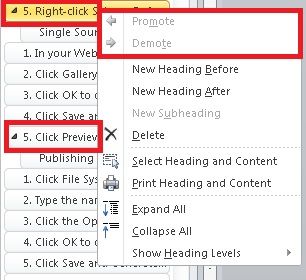 I tried copy/pasting the entire document into a new file, and it retained the attributes in the navigation pane, as above. So it isn't the file. When I open the TOC dialog, I can see that the wrong styles display as Level 1 (it should only have Heading 1 and Heading 2) but I can't delete them. I would expect to see that option here. The Options and Modify buttons didn't give me the option to select or delete either. Is it somewhere else? 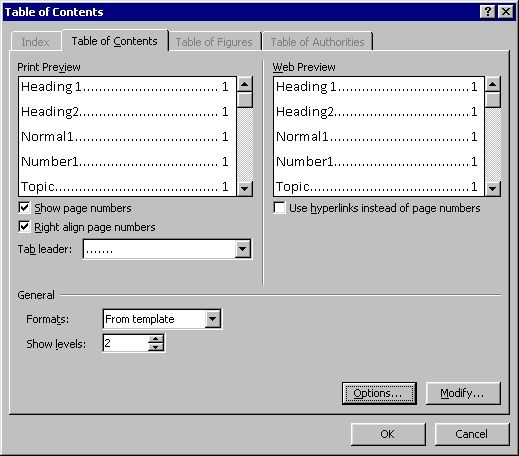

|
|
|
 Similar Threads
|
||||
| Thread | Thread Starter | Forum | Replies | Last Post |
 auto-generated Table of Contents has poor formatting? auto-generated Table of Contents has poor formatting?
|
dylansmith | Word | 7 | 11-02-2012 06:55 PM |
|
Table of Contents
|
ep2002 | Word | 4 | 06-20-2012 10:23 PM |
| Table of Contents - Direct Field Implementation - Auto-Update Numbering | ztag | Word | 3 | 01-19-2012 03:04 PM |
|
Auto-Format Tables of Contents/Figures
|
judicial85 | Word | 3 | 12-25-2010 02:02 AM |
| Table of contents | markos97 | Word | 0 | 10-26-2010 08:52 AM |


 Threaded Mode