
|
|
#1
 07-23-2014, 06:51 AM
|
|||
|
|||
 New "Personal" template ribbon (Word 2013)
Hello all, I’m currently working on a new ribbon solution for Word 2013. What I’m looking for is a simple function that basically just replaces a few clicks to navigate the Word menu, but I’m unable to find something that accomplishes what I’m looking for. The ribbon function should be fairly simple as all it needs to do is to mimic a mouse navigation from “FILE” -> “NEW” -> and then over to “Personal” as I want it to instantly display the templates that I’ve setup. In other words: I want to add 1 button to the ribbon. Pressing this button should instantly send me to my custom template screen. Now, I am aware of the “New Template” function, but that does not do the trick as it doesn’t send me to the same selection of templates. I’m on a work PC and the “New Template”-function only displays official work templates. I need the templates that I’ve setup under the Personal selection under “NEW”. Does anybody know which ribbon function to use / how I can accomplish this? Thanks for any help! Last edited by Charles Kenyon; 07-29-2014 at 08:24 PM. Reason: Mark as solved 
|
|
#2
07-23-2014, 07:28 AM
|
|||
|
|||
|
Add the Classic File>New dialog to your QAT and/or put the command on a keyboard shortcut. This will do 90% of what you want although it won't give you the oversize icons.
See File New Variations in the Versions of Word and Modifying the QAT and Ribbon in Microsoft Word You can download a free Add-In that does this from Add-Ins. The Add-In can have a ribbon button to give you the dialog as well. The first link above gives directions on how to do this on your own. 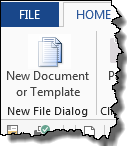 I prefer the QAT / keyboard shortcut to the ribbon button because it is available no matter which ribbon tab is displayed. I do have a custom Ribbon tab of my templates (see below), but that is a lot more work. There are links to how that is done in the second article above if you want to try it (I am talking probably hundreds of hours of work). The custom tab has dynamic menus of templates by categories. Each of the buttons with a down-pointing triangle gives a separate menu. Last edited by Charles Kenyon; 07-23-2014 at 07:54 AM. Reason: Add note about Add-In
|
|
#3
07-29-2014, 07:08 AM
|
|||
|
|||
|
Hello,
Thank you so much for your great reply! I'm super sorry about my late reply here. I forgot my password and left my work PC at the office for a few days. Once again thanks for your help, I'll end up with the first solution as the 100 days + version might be a bit too much for this specific task. It looks awesome though, so great job!
|
|
#4
07-29-2014, 08:23 PM
|
|||
|
|||
|
You are welcome.
|

|
|
|
 Similar Threads
|
||||
| Thread | Thread Starter | Forum | Replies | Last Post |
| Disable "Save" & "Save As" & "Print" ribbon | Villalobos | Word VBA | 3 | 07-14-2014 11:37 PM |
 Can't find "References" on Word 2013 Can't find "References" on Word 2013
|
Lyn Z. Page | Word | 1 | 05-29-2014 09:57 AM |
| When composing an e-mail how do I add "Page Layout" and "View" tabs to the ribbon | CensorTilSin | Outlook | 1 | 12-11-2013 12:05 PM |
|
how to make the "Picture Tools" ribbon permanent?
|
skipstocks | Word | 1 | 07-19-2013 06:51 AM |
|
PST Import - "Not a Personal Folder File"
|
stucraig.uk | Outlook | 2 | 03-30-2011 04:00 PM |


 Windows 7 64bit
  Office 2013


 Linear Mode
