
|
|
#1
 08-08-2013, 01:09 PM
|
|||
|
|||
 2007 New Dialogue Box, Custom Templates To Top?
I have added some custom templates to my desktops, but would much prefer if when you click "New", the custom templates appear at the top, and/or already selected.
Moving the circled bit to the top?  Is this possible with a registry tweak? Thanks. 
|
|
#2
08-09-2013, 06:25 AM
|
|||
|
|||
|
Not sure why you want this rather than a list of the templates on your computer in the User Templates and Workgroup Templates folders.
See this thread on the MS Answers forum. Otherwise, it is possible to modify the Ribbon and actually give you one or more menus for your templates, but this is not a simple project. Customize the Ribbon (It doesn't take rocket science) I have menus on my Ribbon that give a list of all templates in a given folder and start new documents from those templates when they are selected.
|
|
#3
08-10-2013, 12:18 AM
|
|||
|
|||
|
Thanks.
I tried to create a tab, and managed to do so, but could not get the demo macro's to work at all! Do you have any demo templates? Not too sure exactly to add the templates to the additional tab... Thanks for the pointer.
|
|
#4
08-10-2013, 07:30 AM
|
|||
|
|||
|
First, you cannot create tabs like this within the Word interface (especially in Word 2007), you need to edit XML and employ visual basic for applications.
Greg Maxey has a number of samples on his site. Microsoft Word Help, Tips and Tutorials @ The Anchorage He has a picture of dynamic ribbon menus that give a list according to what you put in a folder in his post on this thread. Have you first looked into the classic tabbing available? 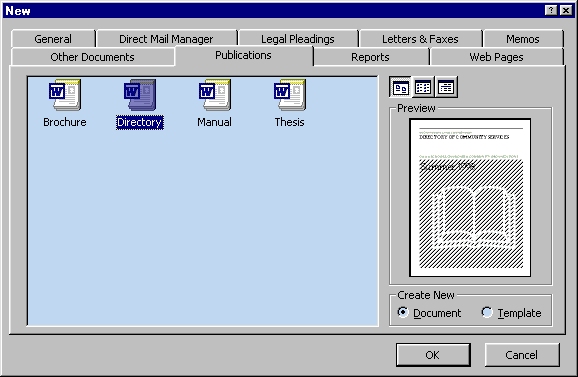 You can create tabs like this in this dialog by putting a folder in the user or workgroup templates folders. Whatever you put in the folder will show up on the tab. Templates in Microsoft Word describes how to create a tab and in this dialog. It isn't as slick as the menus but it is a lot easier. You can add a shortcut to call this dialog up to your QAT or (as I have) attach it to the Ctrl-N keyboard shortcut in Word. This is very easy to do. If you want to do the menus, I can supply a starter I suppose. Last edited by Charles Kenyon; 08-10-2013 at 04:08 PM.
|

|
|
|
 Similar Threads
|
||||
| Thread | Thread Starter | Forum | Replies | Last Post |
| assigning custom templates to custom tab | rich_cirillo | Word | 0 | 10-18-2012 05:59 PM |
 Opening/Saving dialogue box Opening/Saving dialogue box
|
ACA | Word | 1 | 08-03-2011 02:01 AM |
| Custom Report Templates | fervorking | Outlook | 0 | 05-25-2011 09:39 AM |
|
Cannot access Mailing Labels - dialogue box comes up as below
|
Qwerty | Office | 3 | 03-26-2011 07:41 PM |
|
custom toolbar with buttons to open new docs based on templates
|
Brandi | Mail Merge | 18 | 06-15-2010 02:10 PM |


 Windows 7 64bit
  Office 2007


 Linear Mode
