
|
|
#3
 03-31-2017, 03:17 PM
|
|||
|
|||

If you simply need to change the header to match the section, use the StyleRef Field without section breaks. If there is another reason for the section breaks (as in using the Different-First-Page setting that is only available with a section break) then you'll have to go to each section and reformat the page numbering to continue from previous section.
Here is a utility that can help you do that. Continuous Page Numbering Add-In 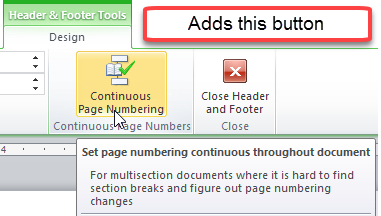

|
|
|
 Similar Threads
|
||||
| Thread | Thread Starter | Forum | Replies | Last Post |
 Headers, footers and page numbers Headers, footers and page numbers
|
Martin Cooper | Word | 2 | 04-19-2016 07:31 PM |
| Cannot delete Page numbers in one footer section without affecting others | ravl13 | Word | 2 | 05-20-2014 04:58 PM |
| Adding a page without affecting all page numbers in doc | gf1701 | Word | 1 | 03-11-2013 01:25 AM |
| Two column format without affecting neither the page numbers nor the header or footer | Jamal NUMAN | Word | 4 | 02-21-2012 03:20 PM |
|
Word page numbers and footers.
|
drenriza | Word | 5 | 01-27-2011 12:47 AM |


 Windows 10
  Office 2013


 Threaded Mode