
|
|
#1
 09-29-2018, 10:19 PM
|
|||
|
|||
 How to get rid of horizontal lines after each paragraph?
Hello,
Weeks ago I must have changed something in Word 2016 for Mac, and since that time I'm seeing gray horizontal lines on the screen in Print Layout and Web Layout which are drawn after each paragraph, one line after each paragraph. These lines appear in all documents, also in the templates that came with Word. The lines are not printed though; they also don't appear in the Print Dialog when I choose "Print" from the File menu. I faintly remember playing with Borders and Shading when this happened, but I'm not sure. Anyway, I have tried everything I can think of to get rid of these lines: I have deleted the Normal.dotm template from the Templates folder as well as the Word preferences file in the ~Library –> Preferences, but to no avail. Can anyone tell me how to get rid of these lines? Word v16.16.2 Office 2016 for Mac macOS X 10.12.6 (= Sierra) 
|
|
#2
09-30-2018, 02:08 AM
|
||||
|
||||

You have the Word option set to show text boundaries - if the Mac version is similar to the PC version, the setting is in File > Options > Advanced > Show Document Content.
__________________
Graham Mayor - MS MVP (Word) (2002-2019) Visit my web site for more programming tips and ready made processes www.gmayor.com
|
|
#3
09-30-2018, 06:08 AM
|
|||
|
|||
|
On the Mac the command chain likely starts with Word > Preferences
|
|
#4
09-30-2018, 11:27 PM
|
|||
|
|||
|
How to get rid of horizontal lines after each paragraph?
Quote:
Could you be so kind and upload a screenshot of the setting which is responsible for the pesky lines I'm trying to get rid of? That would be of great help. In the meantime, here is the Border and Shading pane that my intuition says might perhaps have something to do with "text boundaries".
|
|
#5
10-01-2018, 03:31 PM
|
|||
|
|||
|
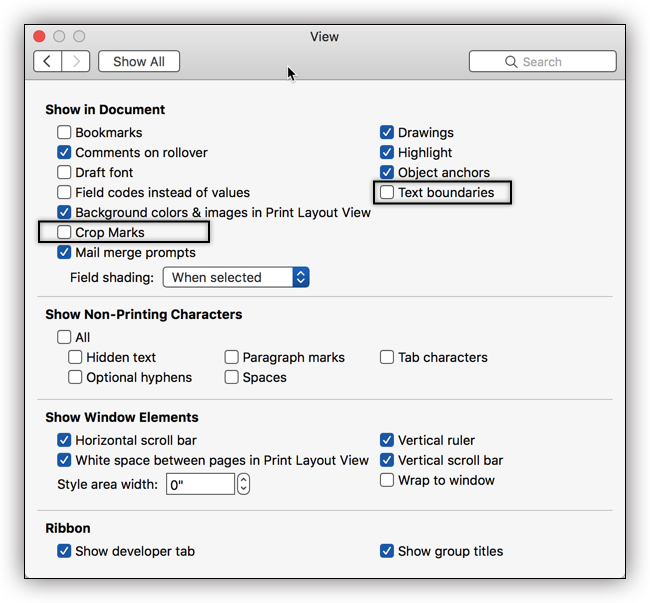
Look in Edit and View.
You are looking for "Text Boundaries." There is no exact one-to-one correlation of the dialogs. Here is the Windows version. Here is an earlier Windows version which may track more closely with the Mac version.
|
|
#6
10-07-2018, 10:53 AM
|
|||
|
|||
|
How to get rid of horizontal lines after each paragraph?
Quote:
Anyway, there is absolutely no setting for "text boundaries" in my version. The format menu contains "Document", and choosing that reveals the "Borders" button, which opens the 'Borders and Shading' pane of which I included a screenshot in my second post. Isn't somebody here who is using the Mac version and might be able to help?
|
|
#7
10-07-2018, 01:16 PM
|
||||
|
||||
|
Look in the Word Preferences dialog box. Elsewhere, someone suggested Preferences > View > Text Boundaries. Does that help?
(Sorry, I'm on Windows too.)
__________________
Stefan Blom Microsoft Word MVP Microsoft 365 apps for business Windows 11 Professional
|
|
#8
10-07-2018, 05:31 PM
|
|||
|
|||
|
Last edited by Charles Kenyon; 10-08-2018 at 10:57 AM.
|
|
#10
10-08-2018, 12:28 PM
|
|||
|
|||
|
How to insert the green "solved" icon?
I see that some threads in the forum have a green "solved" icon at the beginning. Since my problem has now been solved, I thought it might be a good idea to delete the question mark icon and insert a "solved" icon instead. How do I do that?
I thought I better ask before I screw up everything … 
|
|
#11
10-08-2018, 01:15 PM
|
|||
|
|||
|
Edit your original post and click the Go Advanced button.
You can give a reason for editing and change the Icon to "Solved." Thanks for asking.
|

|
| Tags |
| solved |
|
|
 Similar Threads
|
||||
| Thread | Thread Starter | Forum | Replies | Last Post |
 Replacing horizontal lines Replacing horizontal lines
|
eosrose | Word VBA | 2 | 06-16-2023 11:58 PM |
|
Unwanted horizontal lines on word
|
3309v | Word | 6 | 10-19-2015 09:57 PM |
| Horizontal Lines | Kingsmoss | Word | 7 | 04-27-2014 07:25 PM |
| Paragraph mark after horizontal line is way to the right. | DBlomgren | Word | 0 | 02-09-2014 11:42 PM |
|
putting in horizontal lines
|
BigDan | Word | 1 | 03-20-2012 12:21 AM |


 Mac OS X
  Office 2016 for Mac







 Linear Mode
